Is your workstation arranged so you can work efficiently? That means having your monitor, keyboard, mouse, and workstation tools—such as your telephone and document holder—well placed. When they are, you'll feel better and most likely get more done.
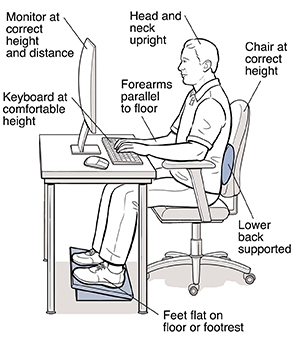
Monitor
Screen height
-
Sit with your lower back supported and feet firmly on the floor or footrest. Hold your head upright and look straight at the screen. The top of your screen should be at or slightly below eye level.
-
If it isn't, ask someone to help you raise or lower your monitor. Place it at a viewing height that allows you to keep your head upright. (If you can't adjust your screen height, place a stand or board beneath your monitor.)
Screen distance
-
Measure the distance from your eyes to the screen. For most people, the screen should be 18 to 30 inches from your eyes, or at about arm's length.
-
If it isn't, get help moving your monitor to the desired distance.
Keyboard
-
Place your fingers on the keyboard's middle row of letters. Your wrists should be straight and relaxed.
-
If they aren't, adjust your keyboard height up or down until your wrists are straight.
-
If the keyboard is too low, put a pad of paper under it.
-
If your wrists are still not straight, readjust your chair height. Make sure your feet remain on the floor or footrest.
-
Wrist rests may be used to support your hands when you are not actively keying (typing).
Workstation tools
-
Arrange your tools so the things you use most are within easy reach. The things you don't use often can be farther away.
-
Place your document holder at the same height and distance as your screen.
-
If you use the telephone a lot, think about using a headset.